Skip to content

Indenter, Spherical (D=6.35 mm)

MA679

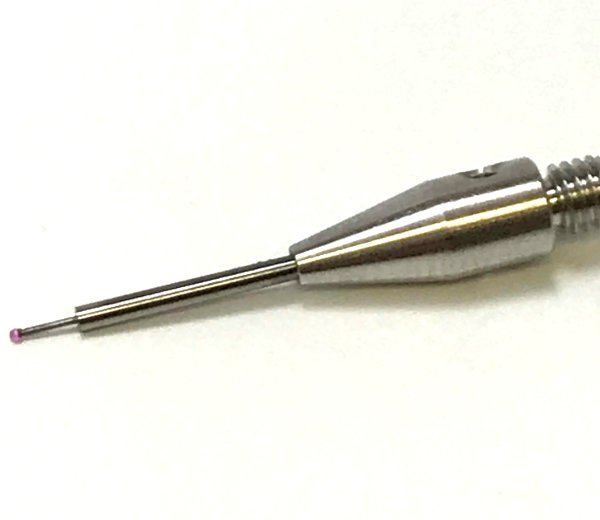
Attached under the load cell it is used to indent a sample

SKU: MA679 Categories: ,

This spherical indenter is used in a wide variety of test configuration.

  • This accessory has been designed to facilitate cleaning and desinfection.
  • This part has a robust design and will keep its integrity for years
  • Designed to be used in contact with physiological saline solution
  • Easy to assemble and mount on the tester
  • A knurling facilitates assembly
Material

Stainless Steel 316L

Diameter

6.35 mm

Upper Attachment

1/4-28 male thread

Documents and resources (2)

Test configurations (6)

FAQ

How does the "Elastic Model in Indentation" works?

This tool allows for the computing and visualizing of the shear modulus (MPa) and the Young’s modulus (MPa) from an indentation test performed using a spherical indenter (Figure 1). This model is well adapted for the mechanical characterization of samples (with critical diameter (width) at least 5 times the indenter diameter) bonded on a flat rigid support (at least 10 times stiffer than the sample), for example: any sheet of material lying on a rigid chamber base (limited sliding at the interface can be assumed) or a cartilage layer attached to a thick sub-chondral bone. A user license is required to obtain the results of the elastic model in indentation (Software Add-On, contact Biomomentum to obtain your license).

Results analysis is performed considering the indentation mechanics of an infinitely wide elastic layer bonded to a rigid half-space which has been developed as a model for the layered geometry of cartilage and subchondral bone (Hayes et al., 1972). (Figure 2) shows a schematic representing the modeled situation.

Many parameters need to be specified in order to calculate the different material properties.

1. Indenter Shape is:

  • Spherical
  • Plane-Ended Cylindrical

2. Indenter radius in mm.

3. Poisson ratio can be selected from a drop-down list (Figure 3)


4. Position @ contact is – defines the position of the left cursor:

  • to be curvefit – will automatically find the position contact which will give the smallest mean squared error (mse)
  • the value at t0 – will automatically take the position contact at the start of the curve
  • the following value (mm) – the user need to specify the value in the corresponding field next to the drop-down list
  • cursor position – the user can drag the left cursor to the wanted position contact

5. Sample thickness is the:

  • position @ contact – will automatically find the position at contact (position of the left cursor)
  • following value (mm) – the user need to specify the value in the corresponding field next to the drop-down list

6. Curvefit is up to – defines the position of the right cursor:

  • peak load – will automatically take the position of the peak load
  • delta load (unit) – the user need to specify the value of the desired delta load in the corresponding field next to the drop-down list
  • delta position (mm) – the user need to specify the value of the desired delta position in the corresponding field next to the drop-down list

The error on the estimation of the best curve representing the stress relaxation curve is calculated using the root of the mean squares (RMS) method and is displayed under “RMSE”. For example, (Figure 4) shows parameters used for the “Normal Indentation” (Mach-1 Motion) function in an indentation testing protocol on ovine articular surfaces. Corresponding results are shown in (Figure 1).

Spherical Indentation Guide – Mach-1 Mechanical Tester – Biomomentum

Mach-1 Analysis – Elastic Model in Indentation – Parameters

Mach-1 Analysis – Elastic Model in Indentation – Poisson ratio choices

Mach-1 Analysis – Elastic Model in Indentation – Cartilage & Subchondral bone

Mach-1 Analysis – Elastic Model in Indentation – Example

How does the Normal Indentation function works?
This function precisely detects the height and orientation of the surface of the sample at the XY position and records the load (for multiaxial load cell only) while simultaneously moving the three linear stages at different speeds in order to move a spherical indenter with a predefined displacement profile along a virtual axis normal to the surface of the sample.

Parameters:
Z-CONTACT CRITERIA - The user specifies the load to be reached until the stage stops moving. The software analyzes the load-displacement curve and moves the stage back to the position where the load had started to increase (twice the load cell resolution) (refer to Find Contact function description).
SCANNING GRID - Specify the distance "d" from the test location of the 4 control points at the surface in the vicinity of the test location (xi,yi) = (-d,0), (d,0), (0,-d) and (0,d).
INDENTATION AMPLITUDE - This is the amplitude of the normal indentation. Full stage range is allowed. A positive amplitude will move the indenter toward the sample (compression).
INDENTATION VELOCITY - This is the velocity of the normal indentation. Refer to the specifications of your Mach-1™ model to learn of the velocity range allowed. In Mach-1 Motion, the speed is always specified in absolute value terms.
RELAXATION TIME - This is the time period during which the position is maintained at the commanded amplitude (relaxation period).

Spherical Indentation Guide – Mach-1 Mechanical Tester – Biomomentum

Mach-1 Motion – Normal Indentation Window

Need Help Choosing an Accessory?

Talk to our team

Report a problem with this page

Your email is used only to follow up on this report.

Screenshots (optional)

Click this area and paste a screenshot, or drag files here. Up to 3 PNG, JPEG or WebP images; 5 MB per image. Hide confidential information first.

Please do not include passwords or customer information. Reports and screenshots are private.