Aller au contenu

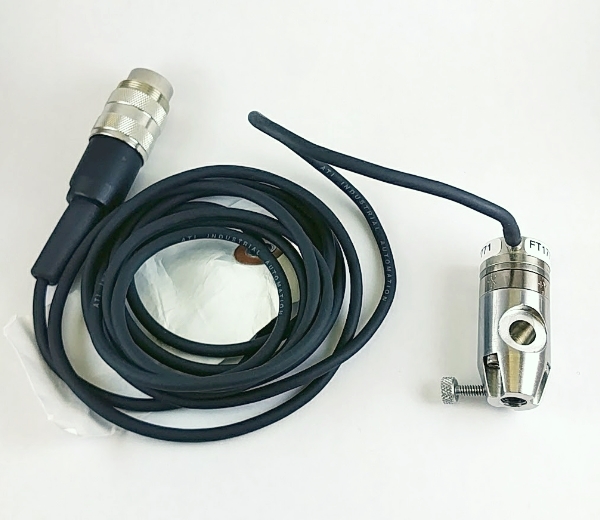
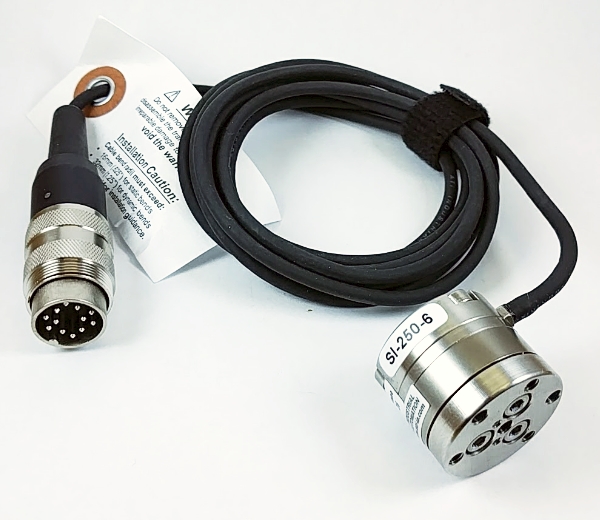
Pièce de remplacement, Cellule de charge multiaxiale (35 N)

MA707

Pour remplacer une cellule de charge multiaxiale

UGS : MA707 Catégories: ,

(En anglais seulement) In the unlikely event that a 35 N multi axial load cell (MA234) gets damaged, add this item to your cart to get a replacement one. A damaged load cell can be shipped back to Biomomentum to confirm that the load cell is physically damaged and cannot be repaired.

  • Facile à assembler et à monter sur le testeur
  • Le plus petit transducteur 6 axes vendu à travers le monde.
Plage de la force (Fz)

+/- 35 N

Plage de la force (Fx, Fy)

+/- 25 N

Plage de torque (Tx, Ty, Tz)

+/- 0.25 N·m

Résolution de la force (Fz)

1.75 mN

Résolution de la force (Fx, Fy)

1.25 mN

Résolution du torque (Tx, Ty, Tz)

12.5 uN·m

Linéarité

≤ 2% sur la plage (par canal)

Fixation du bas

1/4-28 (Filet femelle)

Fixation du haut

3 x M2 (Female Thread, max L=3.5 mm)

FAQ

Le facteur de calibration de ma cellule de charge diffère de 1.0 par plus de 5%; qu'elle peut être la cause?

Différentes causes sont possibles:
  • La cellule de charge activée pourrait ne pas être la bonne. Il vous faut vérifier que la cellule de charge montée correspond à la cellule de charge indiquée dans la boîte de dialogue.
  • La cellule de charge pourrait être endommagée. Veuillez contacter notre support technique si c'est le cas.
Que fait la fênetre de configuration des cellules de charge multiaxiales?
(En anglais seulement) This configuration window allows the user to add calibration weights and edit the parameters of existing ones for the multiple-axis load cell by double-clicking the corresponding line. More than one calibration can be performed with a given weight when considering the torques. The figure shows the different options.

Options:
INSERT - Clicking the “Insert” button will add a “NEW” line in the table, as shown in the following figure.

Double-click the line to edit the parameters: the “Calibration Weight” window will appear.

Enter the name of the calibration weight (e.g. its serial number or its nominal value) in the “Name” box.
Enter its weight (in newtons) in the “Fz, N” box. Enter the torque according to the x (“Tx, N.mm”) or y (“Ty, N.mm”) (in newtons-millimetre) if you wish to perform a calibration using the torque. The force along x (“Fx, N”) and y (“Fy, N”) as well as the torque along z (“Tz, N.mm”) can also be set if required.

DELETE - Click the “Delete” button to delete the selected calibration weight.

Mach-1 Motion – Multiple Axis Load Cell Calibration – Poids d’étalonnage

Mach-1 Motion – Multiple Axis Load Cell Calibration – Insérer

Mach-1 Motion – Fenêtre Calibration de la Cellule de charge à axes multiplles

Besoin d’aide pour choisir un accessoire ?

Parlez à notre équipe

Report a problem with this page

Your email is used only to follow up on this report.

Screenshots (optional)

Click this area and paste a screenshot, or drag files here. Up to 3 PNG, JPEG or WebP images; 5 MB per image. Hide confidential information first.

Please do not include passwords or customer information. Reports and screenshots are private.